


Logex
3.98.00 Reviews
App Specs
- Version
- 1.0.4
- Updated On
- License
- Free
- Downloads
- 50,000+
- Developer
- RAPID DIJITAL HIZMETLER LIMITED SIRKETI
- Categories
- Parenting
- Platform
- Android
Screenshots

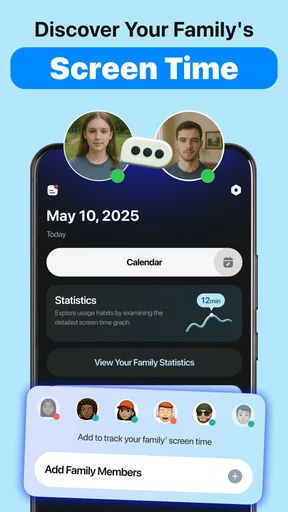
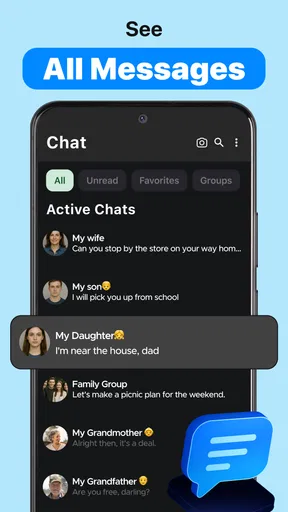
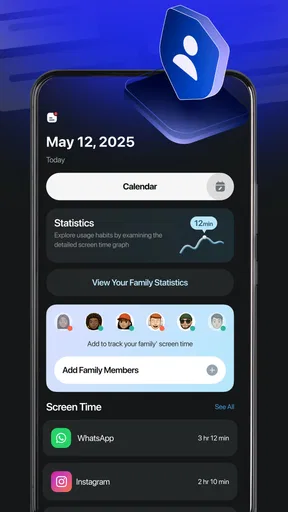
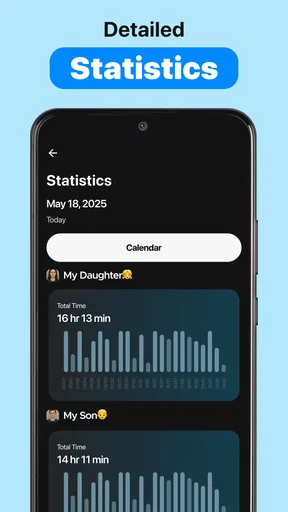
 Analysis by AppCompare
When I judge a parenting app, I look for something that makes family routines easier without adding another chore to the day. Logex takes a different angle from the usual child-monitoring tools: its focus is on sharing screen time with friends and working on digital wellbeing together. That idea can suit parents who want conversations and shared habits to matter as much as limits, though it also means the experience depends on other people being involved.
Where a shared connection changes the experience
Logex is a free parenting app from RAPID DIJITAL HIZMETLER LIMITED SIRKETI. Its central premise is social: screen time becomes something to discuss and work on with friends, rather than a private tally a parent checks alone. In practice, that makes the people you connect with part of the value. If your child’s friends’ families are willing to take part, the shared approach may give everyone a common starting point. If they are not, the idea has less room to work.
That makes connectivity more than a background technical detail. A shared wellbeing routine needs people to stay in the loop, so I would treat a stable connection as important when setting things up or checking in. I would also avoid assuming that every change or update will be visible to everyone at exactly the same moment. For a sensitive family agreement, it is better to confirm the plan with the other parent or child directly instead of relying on an app as the sole messenger.
Useful in everyday mobile moments
The most natural use case I can see is a parent coordinating with another family around a shared routine: for example, agreeing that a group of friends will put devices aside during a visit or focus on an offline activity together. Logex’s social framing can help make that feel like a joint choice rather than one household singling out a child. It is not a substitute for talking through the reasons behind a boundary, but it can give that conversation a practical focus.
On a phone, the app is most useful when a parent can check it briefly at a convenient moment, such as before school pickup or while planning an evening. I would not build a routine that requires constant monitoring. Frequent checks can turn a wellbeing tool into another source of pressure, especially when the goal is to help a child develop healthier habits rather than to watch every minute.
For a more reliable family routine, decide in advance what the shared plan means. Agree on a simple goal, who is participating, and when you will talk about how it went. That small step reduces the chance that a child hears different rules from different adults. It also gives the app a defined role: supporting a conversation rather than replacing parental judgement.
What happens when the connection is unreliable?
Because Logex is built around sharing, connectivity deserves a little thought before you make it part of a time-sensitive arrangement. If a parent is travelling, a child is moving between places, or someone has a weak signal, it is sensible to keep essential plans clear outside the app too. A brief in-person conversation or a direct message through a channel your family already uses can prevent confusion if an update is delayed or someone cannot check in.
Worth Reading Before You Choose

Flipboard Shows What News Apps Must Do Beyond the Feed

Switching to Android Auto Means Rethinking Your Driving Routine

Google Calendar Makes a Crowded Week Easier to Manage

Ludo King Makes the Most of the Minutes Between Plans

Baby Panda World Brings Quick Play to Modern Phones, but Its Game Library Feels Busy

ESPN’s Live Game View Makes Following Close Games Easier
This is also a useful way to handle disagreements. If two families interpret a shared screen-time goal differently, pause the app-based routine and settle the expectations together. Digital wellbeing is personal: one child may need a different balance from another, even among close friends. The shared approach works best as encouragement, not as a public scorecard or a reason to compare children.
Use it thoughtfully on mobile data
Parents who keep an eye on mobile data may reasonably wonder how much a connected social app adds to their routine. I would use it deliberately rather than repeatedly opening it out of habit: check in when there is something meaningful to coordinate, then put the phone away. That is a healthier fit for a wellbeing tool and avoids turning screen-time management into yet more screen time.
It is also worth agreeing with your child on what participation means before inviting friends into the process. Explain the purpose in plain language, decide what information is comfortable to share, and make sure the child has a chance to ask questions. That conversation helps preserve trust and makes the app feel like a family choice instead of a surprise monitoring measure.
How Logex fits beside other parenting tools
Logex is a newer option, released on November 25, 2025, and its current version is 1.0.4. It has an average rating of 3.9 from around nine thousand ratings, with over fifty thousand installs. I would read that as evidence that people are trying it, not as proof that the social approach will fit every family. The app is rated for everyone and is available at no charge, with optional in-app purchases ranging from $4.99 to $9.99 per item. It runs on iOS 8.0 or later.
A different fit from parental controls
Compared with the usual parental-control approach, Logex is best understood as a shared digital-wellbeing idea rather than a complete family safety toolkit. A parent who mainly wants device-level restrictions, detailed usage reports, or a way to manage settings across a child’s phone should look for a tool designed specifically for those jobs. Logex’s distinctive appeal is the social element: it may help families create a common habit with friends, but it should not be treated as a replacement for the controls or safeguards a particular household needs.
It may also be a poor fit if your child does not want friends involved, if the other families are not interested, or if you prefer to keep screen-time decisions entirely within your household. In those situations, a private family conversation or a conventional parental-control app may be more straightforward. The best choice is the one that supports your family’s boundaries without making a child feel watched or compared.
Small choices that make the approach work better
One practical tip is to start with a limited, low-stakes agreement rather than trying to reshape every device habit at once. Pick a specific shared moment, explain what each family hopes to achieve, and check afterwards whether the arrangement felt fair. This gives parents room to adjust without making an imperfect first attempt feel like failure.
Another useful distinction is between participation and compliance. A child can take part in a conversation about wellbeing without agreeing to every suggestion from friends or adults. Keep the family’s own needs in view, and treat the shared plan as a prompt for reflection rather than a rule imposed by a group. That boundary matters because social encouragement can quickly become social pressure if adults are not careful.
If you are deciding whether Logex is right for your household, ask yourself whether you want a shared routine and whether the other people involved are genuinely willing to participate. The app is more compelling when the answer to both questions is yes. If you need a self-contained tracker or strict device management, look elsewhere; if you want a way to make healthy habits a conversation between families, its approach is more relevant.
My take on the connected approach
I see Logex as a focused parenting app, not an all-purpose answer to children’s phone use. Its strongest idea is making digital wellbeing something families can approach together, and its main trade-off is that shared participation and dependable communication matter. Keep an ordinary way to coordinate plans, avoid turning shared goals into comparisons, and use the app as a prompt for discussion. With those expectations, it may be a useful addition for families who want to build healthier screen habits alongside friends.
Have you ever felt overwhelmed trying to keep track of all your tasks and appointments? Well, that's where Logex comes in. I recently gave this app a whirl, and let me tell you, it’s a game changer for anyone looking to streamline their organizational skills.
What’s the Buzz About Logex?
So, what exactly is Logex? Essentially, it’s a productivity app that brings together your to-do lists, calendar, and notes into one intuitive platform. The idea is to eliminate the chaos of juggling multiple apps and bring everything under one roof. Sounds promising, right?
Getting Started
Setting up Logex is a breeze. The app’s interface is sleek and user-friendly. You’re greeted with a simple dashboard that doesn’t overwhelm you with too many options. I was up and running in no time, and honestly, that’s a big plus in my book.
Once you dive in, you’ll notice it's super easy to create tasks, appointments, and notes. Just a few taps, and you’re good to go. The app also offers a handy tutorial that guides you through the basics, which is perfect for those who aren’t particularly tech-savvy.
Features That Stand Out
Now, let’s talk features. Logex is packed with some nifty tools that make life a whole lot easier. Here are a few that stood out to me:
- Integrated Calendar: Sync your calendar with Logex, and it automatically pulls in your appointments. No more missing important dates!
- Customizable Lists: Whether it's groceries or project milestones, you can create lists tailored to your needs.
- Reminders: Set reminders for your tasks and appointments. The notification system is reliable, ensuring you never miss a beat.
- Note-Taking: Jot down quick notes or elaborate plans. I found this particularly useful for brainstorming sessions.
My Personal Experience
Using Logex for a week was quite an enlightening experience. I started by integrating my work calendar and immediately saw how much smoother my day flowed. Having everything in one place meant I wasn’t constantly switching between apps and losing focus.
One feature that I absolutely loved was the ability to categorize tasks. I could easily separate personal tasks from work-related ones, which helped me maintain a much clearer headspace.
Another thing worth mentioning is the app’s aesthetics. It has a minimalist design that I found visually appealing. Plus, it didn’t drain my phone’s battery, which is always a concern with apps that are open all day.
Room for Improvement?
Of course, no app is without its flaws. While Logex is pretty comprehensive, I did notice a couple of areas where it could improve. For instance, the search functionality could be a bit more robust. I occasionally struggled to find specific notes unless they were tagged perfectly.
Also, while the app is great for individual use, it lacks advanced collaborative features. If you’re someone who works in a team setting, you might find this limiting. Hopefully, future updates will address these aspects.
Final Thoughts
All in all, Logex is a solid choice for anyone looking to enhance their organizational skills. It’s simple, effective, and does exactly what it promises without any unnecessary bells and whistles. I’d definitely recommend giving it a shot if you’re in the market for a productivity boost.
Ready to take control of your schedule? Check out Logex today and see the difference it can make in your daily routine.
Pros
- User-friendly interface and easy navigation.
- Offers real-time data analytics.
- Customizable dashboards for personalized insights.
- Secure data management ensures privacy.
- Integrates with other business tools seamlessly.
Cons
- Limited offline functionality.
- Requires a subscription for advanced features.
- Occasional sync issues with large data sets.
- Mobile app lacks some desktop features.
- Customer support response time can be slow.
FAQs for Logex
What is Logex and what does it do?
Logex is a productivity app designed to help users efficiently manage tasks and organize their daily activities. With features like task reminders, calendar integration, and collaborative tools, it aims to streamline workflow and improve time management. This app is ideal for individuals and teams looking to enhance productivity and keep track of their goals.
Is Logex available on both Android and iOS platforms?
Yes, Logex is available for both Android and iOS devices. Users can download it from the Google Play Store and the Apple App Store. The app is optimized for smartphones and tablets, ensuring a seamless experience across different devices and operating systems.
Does Logex offer any collaborative features for team projects?
Absolutely, Logex includes several collaborative features tailored for team projects. Users can share tasks, set permissions, and communicate through the app to ensure everyone stays on the same page. It supports real-time updates, making it easier for teams to track progress and manage deadlines collectively.
Are there any in-app purchases or subscription fees associated with Logex?
Logex offers a free version with basic features suitable for individual users. However, for advanced functionalities such as team collaboration tools and premium support, there are in-app purchases or subscription plans available. These options provide enhanced capabilities for those needing more robust features.
How secure is my data in Logex?
Logex prioritizes user data security and implements robust encryption methods to protect sensitive information. The app complies with industry standards and privacy regulations to ensure user data remains confidential. Regular updates and security patches are also applied to maintain the app's integrity and safeguard against potential threats.


